
Prerequisites
- MetaMask Wallet: You need to have the MetaMask extension installed on your web browser
Install Metamask-> Visit https://metamask.io
Adding IoTeX to MetaMask
After MetaMask is installed in your browser, it comes pre-configured to connect to the Ethereum blockchain. However, you can easily add configurations for additional blockchains to use it across multiple networks, including IoTeX. You can do this either by entering the blockchain network configuration details manually or by using the links provided on the IoTeX Developer Portal.Automatic Configuration
For a simpler and error-free setup, you can automatically configure MetaMask to add the IoTeX network: -> Visit the IoTeX tools pageManual Configuration
Follow these steps to manually add the IoTeX network to MetaMask:- Open MetaMask: Launch the MetaMask extension or app.
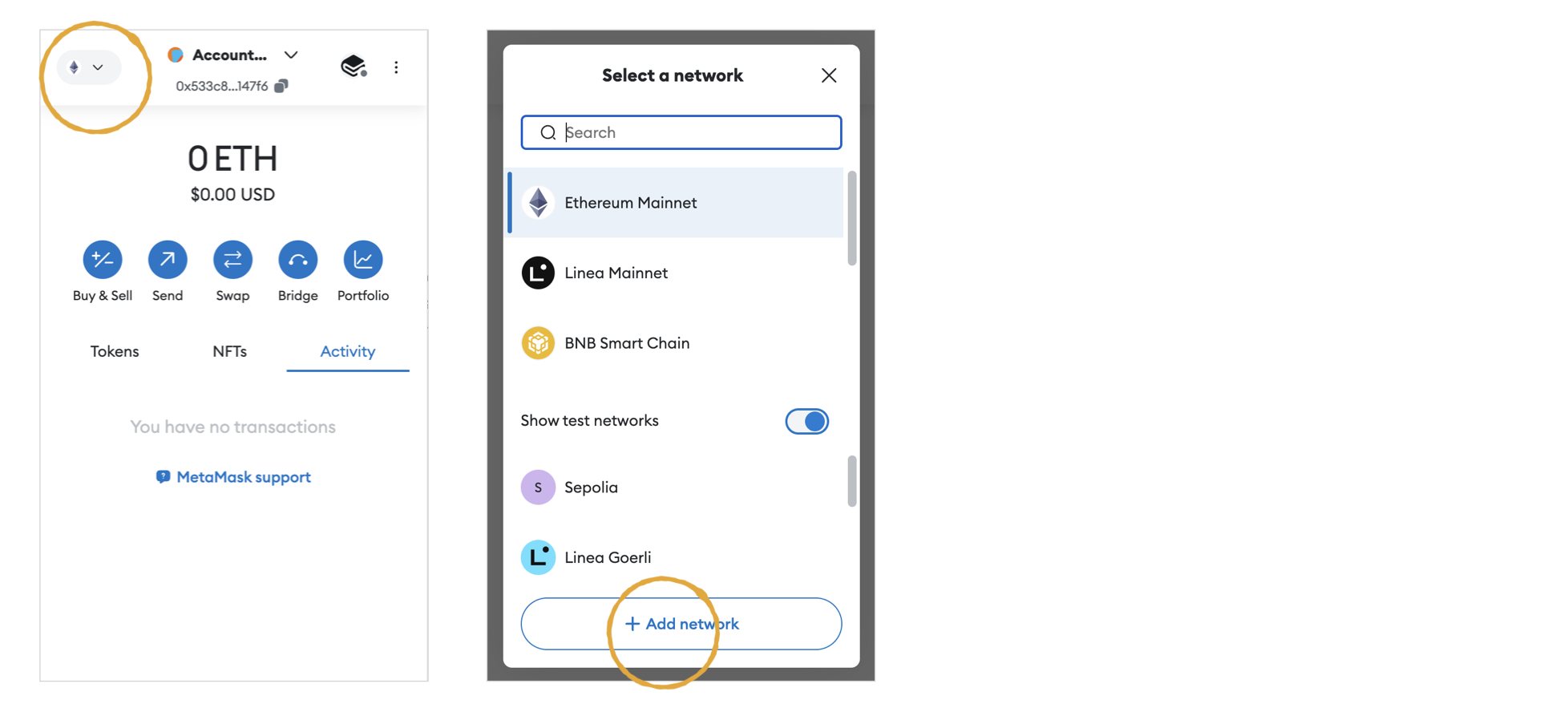
- Access Network Selection: Click on the network dropdown menu at the top of the app (defaulted to Ethereum Mainnet).
- Add Network: Select “Add Network” or “Custom RPC” at the bottom of the network list.
- Enter IoTeX Network Details: Input the following network configuration details:
- Network Name: IoTeX Mainnet
- New RPC URL:
https://babel-api.mainnet.iotex.io - Chain ID:
4689 - Currency Symbol: IOTX
- Block Explorer URL:
https://iotexscan.io
- Save: Click “Save” to add the IoTeX network to your MetaMask wallet.
Check out the RPC Endpoints page for updated RPC endpoints for The IoTeX Mainnet and Testnet